AI-Powered Database Migration: That Saved Millions
Introduction
In early 2025, I led the payment team through a database migration from IBM DB2 to MySQL. Internally we called it Project Itchy Bird. Our payment domain was picked to go first, which meant we’d be figuring things out for everyone else too. Building the tools, hitting the edge cases, writing the playbook other teams would later follow.
We were dealing with 109 tables, some close to 1TB, all holding PCI-scoped sensitive data. There was no room to get this wrong.
I want to share what we did, what worked, what didn’t, and the tools I built along the way, including a validation tool that ended up being adopted across the company.
Why We Migrated
We had a big, shared DB2 database. A lot of services depended on it.
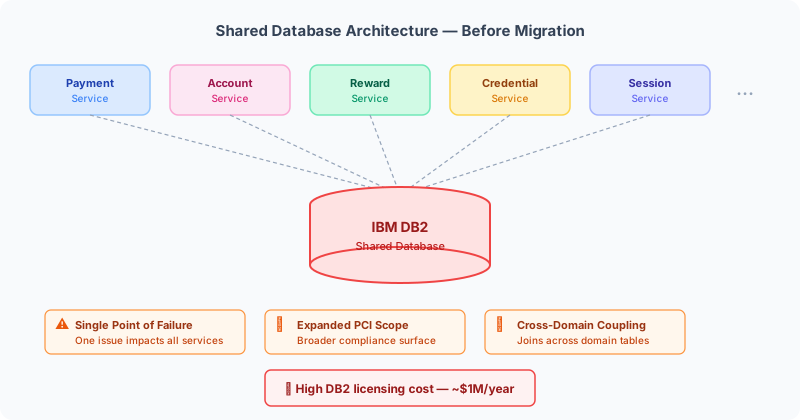
The problems were real:
- Single point of failure. If something went wrong with one table, it could take down unrelated services like deposits and wagering.
- PCI scope was too wide. Sharing a database across domains meant the compliance surface area was bigger than it needed to be. More audit headaches.
- Tight coupling. Services were joining to tables they didn’t own. That made independent deployments painful.
- Cost. DB2 licensing was expensive. Really expensive.
The fix: give each domain its own MySQL database. Smaller PCI scope, operational independence, and millions in annual savings by dropping the DB2 licence.
Technical Approach
DDL and Query Conversion with AI
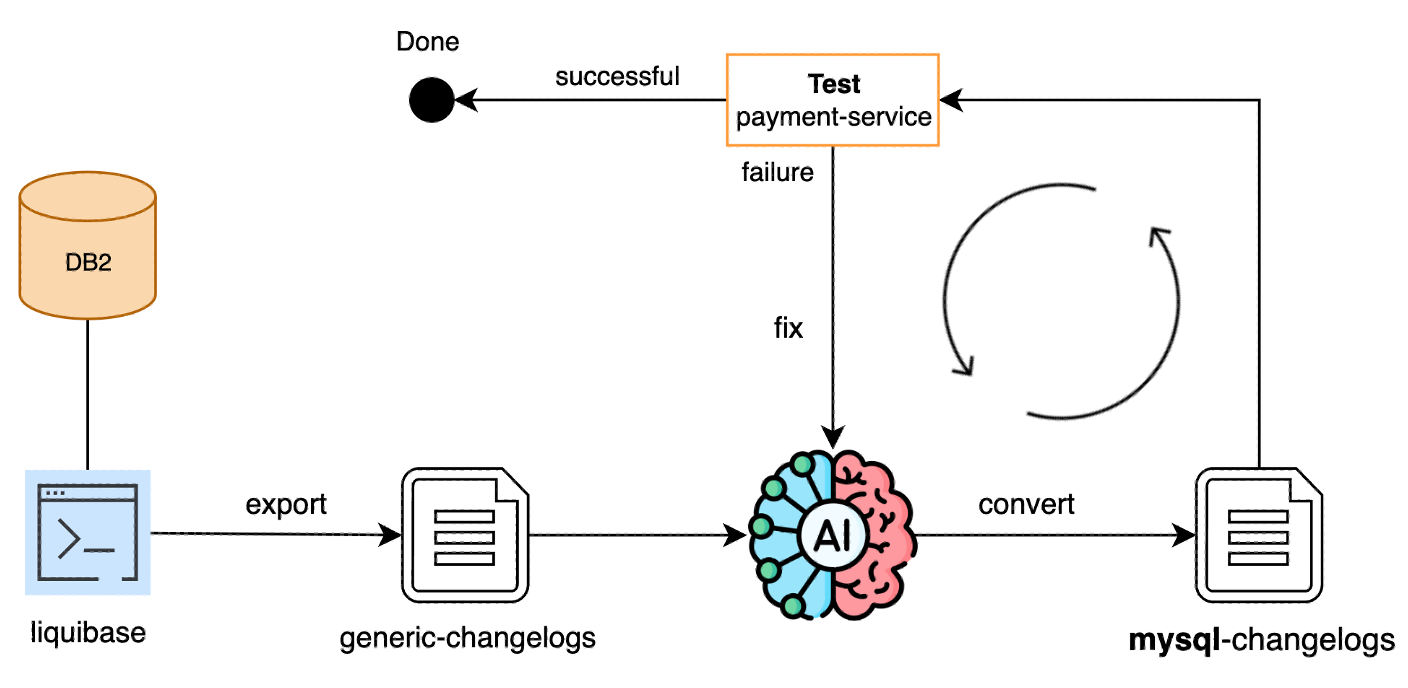
We needed to convert hundreds of DB2-specific DDL definitions and SQL queries to work with MySQL. Doing this by hand would have taken ages and been error-prone, so I set up an AI-assisted workflow.
First, we exported a generic changelog using Liquibase, which gave us a mostly database-agnostic starting point. Then I used Cursor AI to do the heavy lifting.
For DDL conversion, I started by feeding individual DDL files to the AI and checking the output. Once I was confident in the pattern, I pointed it at the whole project and let it convert everything in one go. Then I reviewed it all.
For query conversion, same idea. The AI converted DB2 queries in repository classes to MySQL syntax. What would have taken days took minutes.
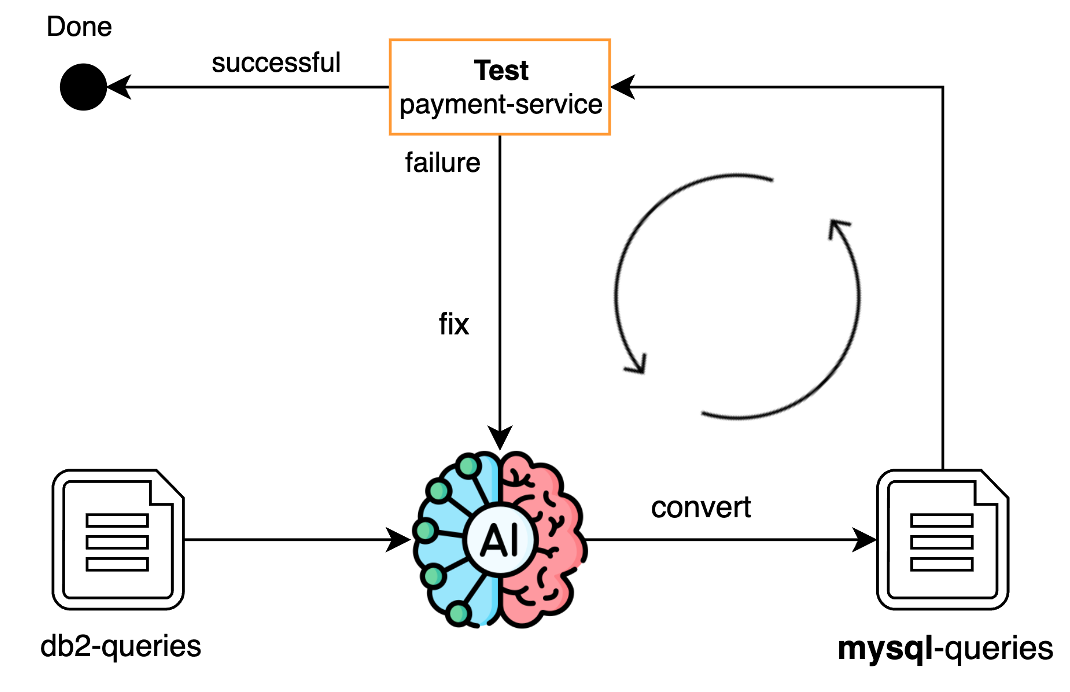
We initially tried the company’s internal AI tool, but it wasn’t great for this. You had to copy-paste each code block in, then copy it back to your IDE and fix formatting. Cursor was much better since it works directly in the codebase.
Of course, every AI output needed careful review. The AI sped things up, but it didn’t replace the need to actually understand what the queries were doing.
Codebase Architecture for Dual-Database Support
One thing I had to get right early on was how to keep both DB2 and MySQL code running side by side. We couldn’t just swap everything over and hope for the best. Other features were still being developed.
Here’s what I came up with:
- Separate query classes. DB2-specific and MySQL-specific queries lived in different Java classes. Common queries stayed shared. Clean separation, no duplication.
- A single environment variable (
active_database) controlled which database was active. The Spring config created the right datasource and query helper based on this variable. - No pipeline duplication. Instead of creating a separate CI/CD pipeline for MySQL (which would’ve been a maintenance headache), I added the database selection as a parameter. Same pipeline, re-trigger with a different env variable. Done.
This meant we could keep shipping features on DB2 while testing MySQL in parallel. Nobody was blocked.
Performance Testing from Scratch
We didn’t have any performance tests for the payment service before this project. I built a performance testing setup using Java, Maven, and Gatling.
Rather than writing all the test simulations manually, I grabbed cURL commands from our Postman collections and asked Cursor to turn them into Gatling simulations. It worked well. We had solid performance coverage in hours instead of weeks.
Building the DB Migration Quality Checker
This was probably the most important thing I built during the whole project.
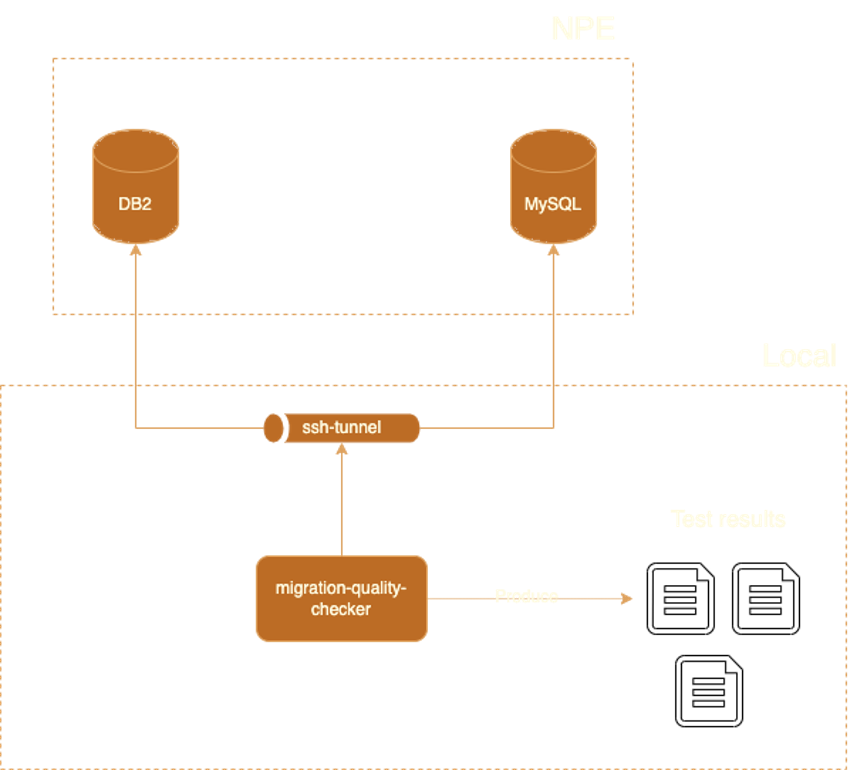
I looked at existing comparison tools, but none of them did what we needed. We had tables close to 1TB, so we couldn’t just compare everything. We needed to run checks from the terminal against different environments, customise which schemas to compare, and ignore known differences between DB2 and MySQL dialects. Off-the-shelf tools couldn’t do any of that.
So I wrote a custom Java application, the DB Migration Quality Checker. It connects to both databases and runs a series of checks:
| Check | What it does |
|---|---|
| Total record count | Compares row counts between tables |
| Random data sampling | Picks 10,000 random records per table, compares field by field |
| Column metadata | Checks column names, types, default values, nullability |
| Auto-increment | Makes sure auto-increment configs match |
| Index validation | Compares indexes between source and target |
| DDL structure | Full schema comparison including constraints |
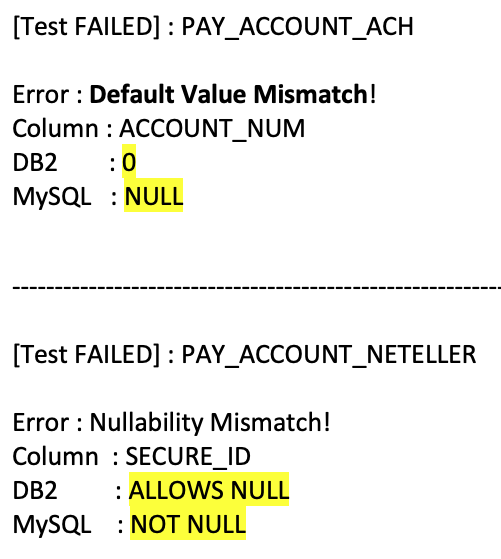
When something fails, the report tells you exactly which table, which column, what the values are in each database, and gives you a ready-to-run SQL query so you can investigate immediately. No digging around.
Performance was a big deal here. During the actual production cutover, every minute of downtime matters. The first version of the tool took over an hour to run. I parallelised all the queries and got it down to about 8 minutes across all 109 tables.
I also made the tool schema-agnostic from the start. It works with any tables, not just payment ones. That turned out to be a good call. Other teams across the company picked it up for their own migrations, and it became a standard part of the migration toolkit.
Production Deployment Strategy
The prod deployment needed to be carefully choreographed. Here’s the process I designed:
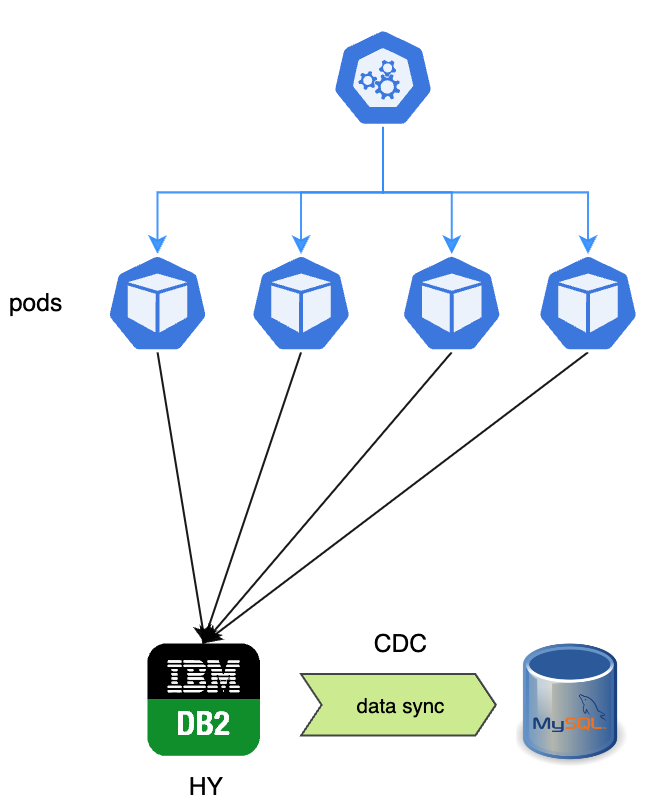
Step 1: Initial state. Four pods running, all connected to DB2. CDC (Change Data Capture) replicates data to MySQL in the background.
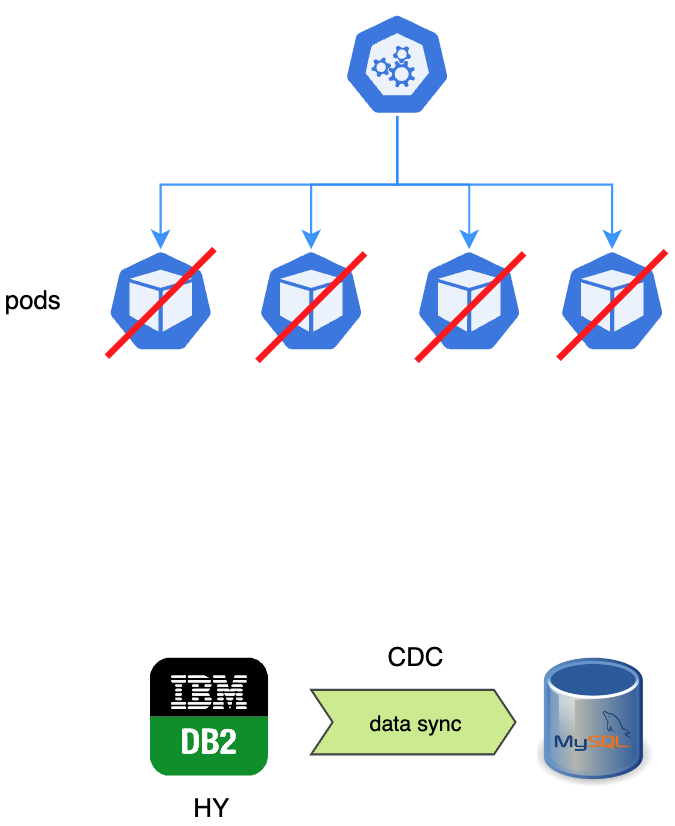
Step 2: Scale down. Set replica count to zero. All pods stop. DB2 gets no more writes. Wait for CDC to finish syncing the last batch.
Step 3: Validate. Disable CDC. Run the quality checker against prod data. If anything fails, we roll back. Full stop.
Step 4: Switch. Set active_database to MySQL, scale pods back up. They come up pointing at MySQL.
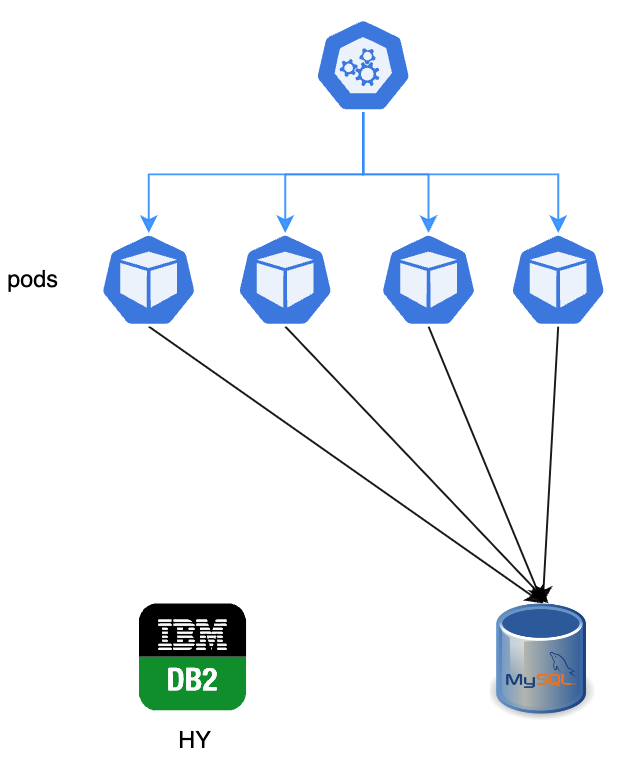
The whole thing was built around rollback. At any point before the switch, we could go back to DB2 with zero data loss.
Unexpected Challenges
We ran into issues that didn’t show up in testing environments. The quality checker caught most of them.
Character Encoding
On the non-production environment, the quality checker flagged character encoding differences. Turned out it was a CDC configuration issue. We fixed it before it reached prod.
Data Count Mismatches
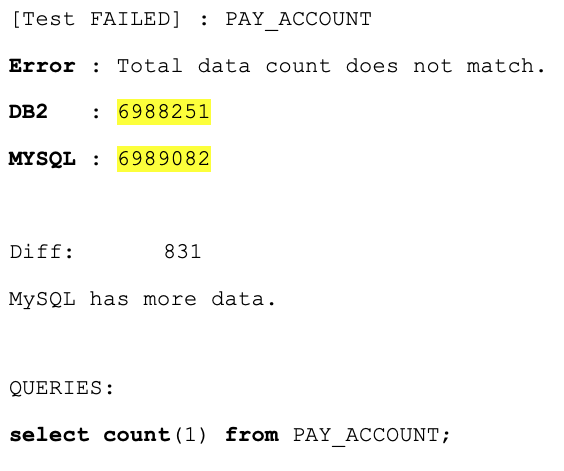
Row counts didn’t match on some tables. The reports showed exactly which tables and by how much, so the data team could track down the cause quickly.
Missing Indexes and Metadata Differences
We also found missing indexes on the MySQL side, and some columns had different default values or nullability settings after the DDL conversion.
The First Production Attempt Failed
On 2 April 2025, we tried to go live. The quality checker found mismatches on 8 large tables. The problem was a sequencing issue when combining CDC replication with manual data loading for our biggest tables.
Because the quality checker caught it before any traffic hit MySQL, we rolled back cleanly. No impact on users.
We fixed the issue and went live successfully on 23 April 2025.
Results
| Outcome | Detail |
|---|---|
| Cost savings | Millions per year by dropping DB2 licensing |
| PCI scope | Reduced. Separated database means smaller compliance surface |
| Independence | Payment domain fully decoupled from the shared database |
| Data integrity | Zero data loss, validated by the quality checker |
| Company-wide adoption | Other teams adopted the quality checker and the AI workflow |
| Knowledge sharing | I gave an internal tech talk about the whole approach |
The quality checker and the AI-assisted conversion workflow both got picked up by other teams. What started as payment-specific tooling became the standard approach for database migrations across the company.
What I’d Tell Other Teams
A few things I took away from this:
- Build your validation tooling first. The quality checker saved us multiple times. It caught things that would have been disasters in prod. If you’re doing a migration, invest here before anything else.
- Always have a rollback plan. Our first prod attempt failed. We rolled back in minutes because we’d designed for it. If we hadn’t, that would’ve been a very different story.
- AI is a great accelerator, but you still need to review everything. It turned days of mechanical work into minutes. But it also got things wrong sometimes. Don’t skip the review.
- Make your tools generic. It took a bit more effort to make the quality checker work with any schema, but that’s why other teams could adopt it. That ended up being a bigger impact than the migration itself.
- Production will surprise you. We tested extensively on non-prod environments and still hit issues on the day. Your test data is never quite like your real data. Plan for that.
Wrapping Up
This was one of the most complex projects I’ve worked on. 109 tables, PCI-scoped data, a failed first attempt, and a tight downtime window. But the quality checker caught what it needed to catch, the AI tooling saved us weeks of manual work, and the deployment strategy gave us a clean rollback path when we needed it.
If you’re facing a similar migration, my honest advice: spend most of your time on the tooling that validates the migration, not the migration itself. That’s what actually keeps you safe.